

Quick answer: AI design to WordPress gets expensive when the AI works on the finished WordPress page, because every client revision makes the model read and rewrite verbose block markup. Designing in a tool where revisions are cheap, then converting once to WordPress, cuts the tokens by roughly 3x in the model below. This guide shows the numbers, the assumptions behind them and where the shortcut does not apply.
Introduction
Agencies now have three kinds of AI helpers: agents that edit WordPress directly through MCP, design tools such as Figma, Relume, Claude Design, Penpot, Lovable, Bolt.new, v0, Google AI Studio and Google Stitch, and converters that turn a finished design into WordPress. The question behind ai design to wordpress is simple: where should the AI do its work?
The answer depends on tokens, because tokens are what you pay for, directly or through credits. This article compares two routes for ai design to wordpress, uses list prices from the vendors’ own pages, and puts the consumption in tables you can reproduce. It also says where the numbers are assumptions, because an honest ai design to wordpress comparison needs that.
Why Tokens Decide the Cost of AI Design to WordPress
What You Pay for in AI Design to WordPress
Language models bill three kinds of tokens: input (what you send, including the whole conversation again on each turn), output (what the model writes) and cached input (repeated input served at a discount). In the official tables below, output costs five times as much as input, so generating or rewriting a large page is the expensive part of ai design to wordpress.
AI Design to WordPress List Prices, Checked on October 26, 2026
| Model or product | Input per 1M tokens | Output per 1M tokens | Note |
|---|---|---|---|
| Claude Sonnet 5.5 | $2 | $10 | Cache reads $0.10 |
| Claude Opus 5.5 | $4 | $20 | Cache reads $0.20 |
| Claude Fable 5.1 | $10 | $50 | Cache reads $0.25 |
| Gemini 3.6 Flash | $0.75, then $1.50 from Jan 1, 2027 | $3.75, then $7.50 | Google lists both prices |
| Gemini 4 Argon | $2, then $4 from Dec 1, 2026 | $10, then $20 | Google lists both prices |
| v0 Pro | $2 | $10 | Billed against credits |
Prices move in both directions
Anthropic lists Sonnet 5.5 at $2 and $10 per million tokens, against $3 and $15 for Sonnet 4.6, so prices can fall. Google’s own page, on the other hand, schedules increases for some models, doubling the listed rate. Subscription tools also keep changing how they meter usage, from flat plans to credits and quotas. Nobody can promise that today’s price per token will hold, so an ai design to wordpress workflow that needs fewer tokens is safer whatever happens next.
Two Routes for AI Design to WordPress
Route A: AI Design to WordPress With an Agent Inside WordPress
The official WordPress MCP Adapter exposes WordPress abilities as MCP tools, resources and prompts, which lets an agent create and edit pages directly. Every edit round in this ai design to wordpress route has the same cost pattern: the agent loads the tool definitions, reads the stored page, and writes it back. What it reads and writes is the stored representation, such as Gutenberg block markup or Elementor JSON.
Route B: AI Design to WordPress by Designing First
In this route of ai design to wordpress, the AI (or you) works in a design tool, the client approves the design there, and only then Tapeto converts it. Tapeto’s conversion engine, which covers parsing, the intermediate representation and block generation, is deterministic code. It does not send your design to a language model to produce the blocks. Only an optional site-structure detector can call a model, and only when its own heuristics are unsure.
How the Design Tools Meter AI Design to WordPress Usage
| Tool | How usage is counted | Source |
|---|---|---|
| v0 | Tokens, charged against monthly credits | v0 pricing |
| Lovable | Credits per message; its example: a landing page with 5 sections and 3 images costs 1.70 credits | Lovable pricing |
| Bolt.new | Monthly token pools, with a daily cap on the free plan | Bolt pricing |
| Figma, Relume, Claude Design, Google AI Studio, Google Stitch | Their own credits, quotas or subscription limits, which change often | Check each vendor before quoting |
| Penpot | Open-source design tool: no AI tokens needed to design by hand | Penpot |
The AI Design to WordPress Token Table for a Five-Page Site
What We Measured for AI Design to WordPress
We built one realistic landing page (hero, features, steps, testimonials, pricing, FAQ, footer) and converted it with Tapeto’s own engine. Sizes in tokens use the usual rule of thumb of four characters per token, so real counts for code are likely higher.
| Representation of the same page | Characters | Approx. tokens | Compared with the source |
|---|---|---|---|
| HTML and CSS (design source) | 10,205 | 2,551 | 1.0x |
| Elementor JSON | 27,790 | 6,948 | 2.7x |
| Gutenberg block markup | 44,650 | 11,163 | 4.4x |
This is one sample, not a benchmark. Still, it shows why ai design to wordpress costs more when the model handles the stored WordPress page: the final representation is simply larger than the design source.
The Assumptions Behind the AI Design to WordPress Model
- Five pages and six client revision rounds per page.
- 6,000 tokens of instructions and history on every turn, plus 4,000 tokens of MCP tool definitions on Route A.
- Each revision rewrites the full page (a worst case for both routes).
- Route A reads the stored page before each revision; Route B edits the design source.
- No images, retries or reasoning tokens, so real sessions will consume more.
The AI Design to WordPress Result
| Scenario | Input tokens | Output tokens | Total |
|---|---|---|---|
| Design first, convert once | 287k | 89k | 376k |
| WordPress directly via MCP, Elementor | 858k | 246k | 1,105k |
| WordPress directly via MCP, Gutenberg | 985k | 394k | 1,379k |
| Scenario | Sonnet 5.5 | Opus 5.5 | Fable 5.1 |
|---|---|---|---|
| Design first, convert once | $1.47 | $2.93 | $7.33 |
| WordPress directly, Elementor | $4.18 | $8.36 | $20.89 |
| WordPress directly, Gutenberg | $5.91 | $11.81 | $29.53 |
For ai design to wordpress with prompt caching on 80% of the input, the Sonnet 5.5 figures fall to $1.03, $2.87 and $4.41. The ratio stays near 3x because output tokens are not cached.
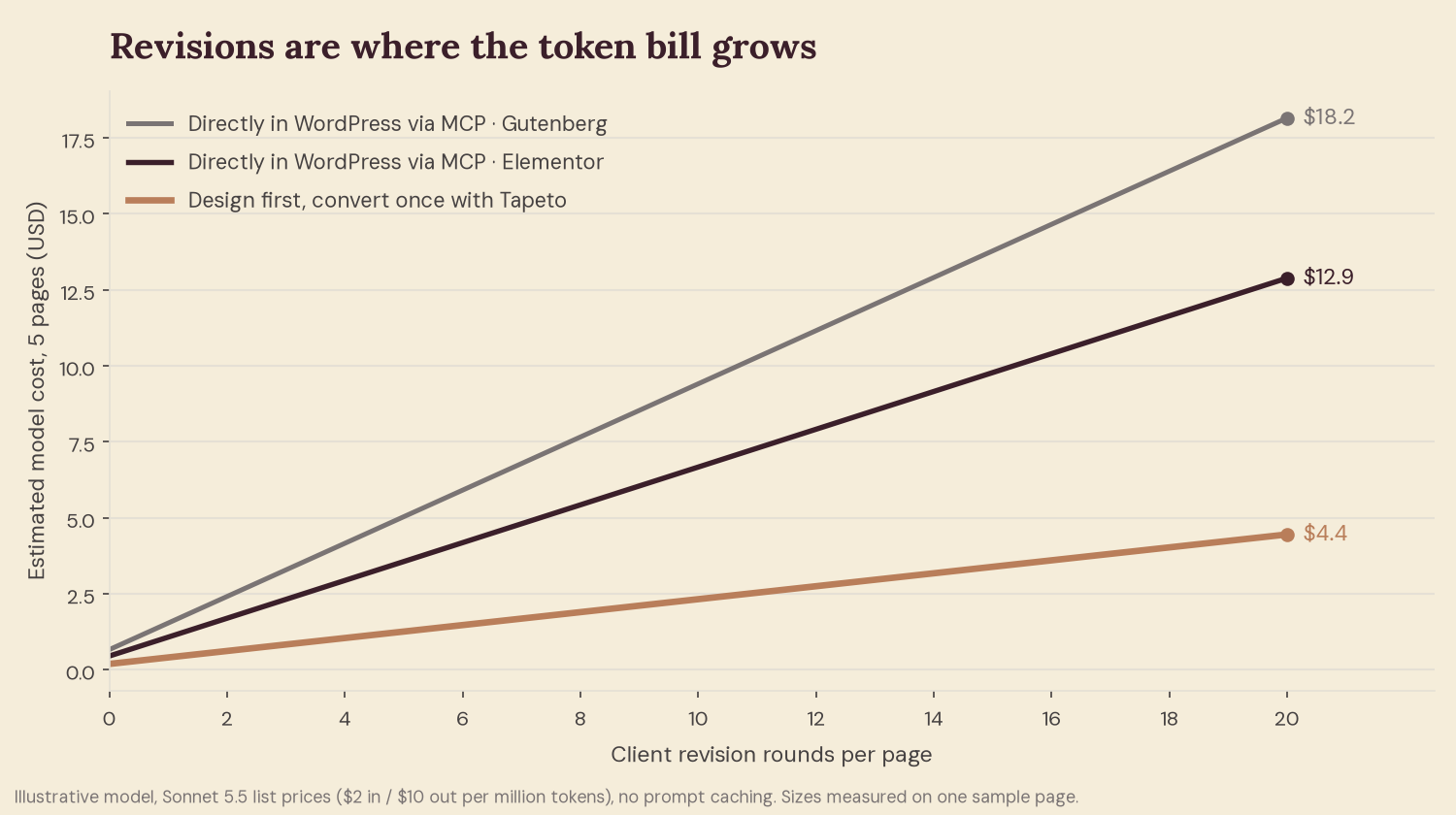
Revisions Multiply AI Design to WordPress Costs
| Revision rounds per page | Design first | WordPress, Elementor | WordPress, Gutenberg |
|---|---|---|---|
| 2 | $0.61 | $1.69 | $2.41 |
| 6 | $1.47 | $4.18 | $5.91 |
| 12 | $2.74 | $7.91 | $11.16 |
| 20 | $4.45 | $12.88 | $18.15 |
What the AI Design to WordPress Model Leaves Out
- In ai design to wordpress, absolute amounts are small on cheap models; the ratio is the point. At Fable 5.1 prices, twenty five-page sites cost about $147 designing first and $418 through Elementor.
- Route A can be cheaper for one tiny text change if the tool patches a single block.
- Design tools bill their own way, so your real invoice may follow credits rather than these list prices.
When Direct AI Design to WordPress Still Makes Sense
- Small edits after launch: a price, a paragraph, a link.
- Dynamic content such as posts, products and custom fields, which a design file does not hold.
- Sites with no design phase, where the client never reviews layouts.
A Practical AI Design to WordPress Workflow
- Start ai design to wordpress where revisions are cheap. Use Figma or Penpot, or ask your AI tool for plain HTML and CSS.
- Get approval before converting. Every round the client requests costs far less at the design stage.
- Prepare the file. Semantic tags, CSS in stylesheets and real text help the Fidelity Score.
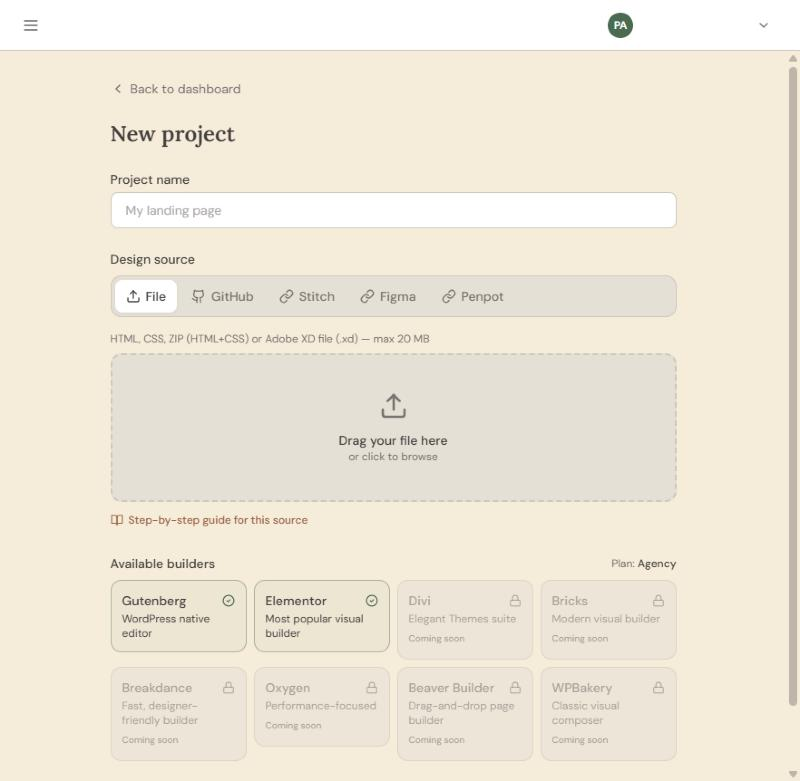
- Convert once. Choose Gutenberg or Elementor and review the result tabs.
- Publish as a draft. Import a WXR file or push to a connected site.
AI builders such as Lovable, Bolt.new and v0 often produce React code. Tapeto reads HTML as delivered, so content that scripts build after load may not be detected. Ask for static HTML and CSS, or export from a design tool.
How We Measured AI Design to WordPress Costs
The numbers in this guide are not copied from a pricing page. On October 26, 2026 we built a realistic landing page, converted it with Tapeto’s own engine and counted the characters of each version: 10,205 for the HTML and CSS, 27,790 for Elementor JSON and 44,650 for Gutenberg markup. The cost model that turns those sizes into dollars is a short script, so anyone can rerun it with their own page, their own number of revisions and their own model.
Working on the conversion engine means knowing how a page is parsed, turned into an intermediate representation and written out for each builder, which explains why the stored WordPress page is so much bigger than the design source. It also lets us say precisely where Tapeto uses a language model and where it does not: the conversion is deterministic code, and only an optional detector can call a model.
Every price comes from the vendor’s own page: Anthropic, Google, v0, Lovable and Bolt. The agent side follows the WordPress MCP Adapter project, and the product details are in Tapeto’s documentation.
Tapeto is our product, and this ai design to wordpress comparison favors the route it supports, so we kept every assumption visible. The result comes from one sample page and an illustrative model, prices change, and your invoice may follow credits rather than tokens. Check each vendor before you decide, and use our figures to compare routes, not as a quote.
Frequently Asked Questions About AI Design to WordPress
1. What does AI design to WordPress mean?
It means using AI to create or edit a design and then getting that design into WordPress as editable content, either by building inside WordPress or by converting a finished design.
2. Is AI design to WordPress cheaper when you design first?
In this ai design to wordpress model, yes: about three times fewer tokens, because revisions happen on a smaller representation and the conversion step uses no language model.
3. Can an AI agent build directly in WordPress?
Yes. The WordPress MCP Adapter exposes abilities as MCP tools, so an agent can create and edit pages. The cost issue is what it reads and writes on every revision.
4. Which tools work for AI design to WordPress?
Any tool that gives you HTML and CSS, a Figma file, a Penpot file or an Adobe XD file. Figma and ZIP or HTML work on every plan; Penpot and XD need Pro.
5. Does Tapeto use AI tokens to convert?
The conversion engine is deterministic code and does not use a language model to generate blocks. An optional site-structure detector can call a model when its heuristics are unsure.
6. How many revision rounds change the math?
In ai design to wordpress, even at two rounds per page the gap exists; at twenty rounds the model shows $4.45 against $12.88 for Elementor.
7. Does prompt caching fix AI design to WordPress costs?
It lowers both routes, but output tokens are not cached, so the ratio between them stays near three.
8. Will AI prices go up?
Vendors’ pages show both directions: newer models can be cheaper, while some listed prices rise on set dates. Plan for uncertainty.
9. Do I need a paid plan for AI design to WordPress?
Gutenberg output and the Free plan allow one project per month. Elementor output, WXR export and publishing need a paid plan.
10. How do I make an AI-generated design convert better?
Ask for semantic HTML, keep styles in CSS files, avoid JavaScript-rendered layouts and check image paths before converting.
Conclusion
AI design to WordPress does not have to burn tokens on every client revision. Keep the AI where changes are cheap, get approval on the design, convert once, and keep direct WordPress agents for small edits and dynamic content.
Want to try it on a real design? Create a free account and run your first ai design to wordpress conversion with a single page.